Here is what Planetary Positions is doing – it is becoming more net savvy 🙂 You can now follow us on Twitter @ http://twitter.com/planetpos.
Any posts written on this blog will be delivered to this twitter account courtesy of Google.
Thank you !!
PS: With this small post, planetarypositions has reached another milestone – 100 articles… Thank you for your continued support.
Yahoo is pulling the plug on Geocities and it will close on October 26, 2009.
The first version of this website went live on Geocities in March of 2001. For a long time, Geocities was the place to serve the static html pages and the applet for this website.
The site had outgrown the “free” services provided by Geocities and I had to move it to its current home. Still, there is a lot of good feelings associated with it and the “sharma_jyotish” nickname I got on the internet.
This astrology site got hurt by piracy again. Someone reverse engineered the chart matching source code from this site and sold to a Sri Lanka based matrimonial site for almost $2,500. The webmaster of this matrimonial site claims to have purchased it from http://www.scriptlance.com/. In the pirated version, the copyright and other information is promptly removed and few display string are changed. The layout and output remains the same. Continue reading
My newsletter server Zookoda is going down and as a result I will not be able to continue the monthly mailer till I figure out an alternative. Quoting from this page:
As a result we have decided to put the Zookoda platform on ice. Users will not be able to login effective January 1, 2009. We will do all we can to assist users in getting their email lists out of the system for use on another platform. We are not selling Zookoda and all user information and emails will remain protected. Think of it as cold storage. Continue reading
The hosting provider has fixed the problem and I was able to run the kundali and chat matching applet as well as generate images on the site. I will keep monitoring the site and will contact the provider if the site goes down again.
Please let me know if you think there are any other problems.
Thanks!
It was brought to my attention by Saraswati from Chennai that the java application on kundali and kundali match page is not working as expected and is failing with a "no initied" failure. It seems to be a problem with the java/jsp/servlet server on my website. I am on the phone with the customer service and trying to figure out the issue.
I have fixed the problem with the applet and the applet seems to be loading, but the chart image generator is not working. You are likely to see this error "Internal Server Error" 🙁
I will keep you updated.
For all those running a WordPress blog, please note – do not mark any spam comment as “spam” while moderation. Just delete it. If you don’t, it will just sit there in the wp_comments table. The performance of your WordPress installation will go down as the size of this table increases.
Why am I ranting about WordPress installation and size of a table instead of writing a post on Astrology? This is because of spam comments, which I realize are almost 80% of all the comments that I receive. I had to undertake a massive cleanup exercise and while I have taken all precautions, I am afraid I might have deleted some genuine comments. If it was one of yours, I apologize.
In the past one week, how many of you have seen the following error message on the blog?
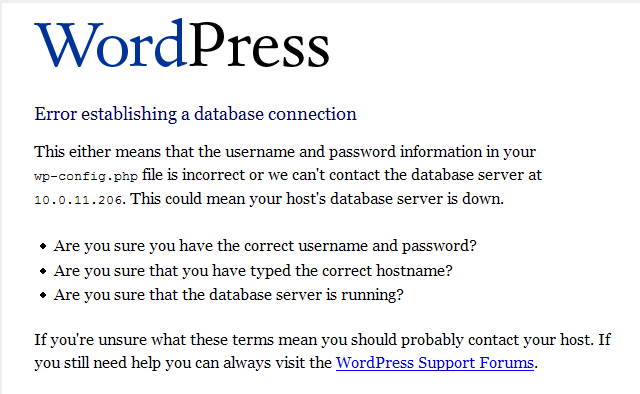
I believe that things should be fine now, but if they are not, please let me know by dropping a line.
Over the weekend, I found out a way of inserting Hindi/Sanskrit words in the articles. I will publish the entire procedure of how to use windows live writer to blog in Hindi on my other blog on blogspot.
Here, I would like to begin with a shloka:
सर्वे भवन्तु सुखिनः सर्वे सन्तु निरामयाः |
सर्वे भद्राणि पश्यन्तु मा कश्चिद दु:खभाग्भवेत ||
This verse taken from Vrihadakaaranyaka Upanishad means – may all be happy, may all be without any diseases. May all see good in the world, may no one have any sorrows.
English would still be my primary language of publication. However, this method would allow me to represent some of words in Sanskrit/Hindi for which transliteration is extremely difficult.
I have been spending almost 20-30 minutes a day to clean out spam hitting the Astrology Notes section on this website. A little more and it would have qualified as vandalism.
What this means is that in the process of leaving a comment on this site, you, as a reader will have to take a test called captcha to prove that you are not a robot. Please don’t worry, this is not a difficult test :-). It involves filling out one more field after filling out the comment, which is a random sequence of letters, which incidentally humans can read very well but a robot cannot.
You will see pictures like these in the “Leave a reply” section and will have to read and type the 5 chars within 0..9 and A..F (case insensitive), and submit the form. Please note that there is no “O” in there and hence no confusion between “0 (zero)” and “O (the letter o)”.
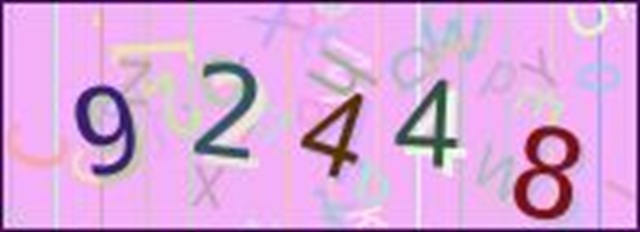
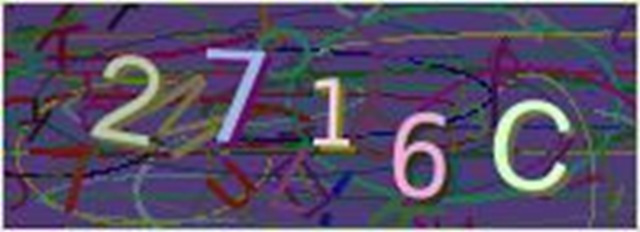
For these two images, you will have to enter “92448” and “2716c” in box, after which your comment will immediately appear on the website. I hope this additional step will not be a problem to the readers who will continue to review and critique the website. I have offloaded a part of the burden on website maintenance on to the readers and I hope they would sympathize with me and understand my situation.
If there is any problem with this feature, please email me at vedic dot astrology at gmail dot com.
Hello Readers,
I have been reading the comments posted to the article – “Strong third house…” and have enjoyed all the comments. Thanks a ton to Anand, Divya Jyoti and Basab Roy for making my effort of maintaining this site worthwhile.
I see a need for a forum where users can register and discuss various aspects of Vedic Astrology. Although there are already tons of sites that give you an option to do that, I just hope there are other things about planetarypositions.com that will attracts the readers here.
Contact Information | Need Help? | Frequently Asked Questions | Astrology Glossary | Sitemap | RSS Feeds
© Copyright 2014-2022, Abhilasha and Kshitij Sharma. All right reserved. Terms of Use.

 VEDIC ASTROLOGY